---
title: "How to use the \"Reports\" module"
description: Eventtia offers a tracking module, allowing you to track certain information about your participants. In particular, you can follow the registration of each participant to the different activities pro
---
[Skip to content](https://help.eventtia.com/knowledge/how-to-use-the-reports-module#main-content)
- [English](https://help.eventtia.com/knowledge/how-to-use-the-reports-module)
- [Español](https://help.eventtia.com/es/knowledge/cómo-utilizar-el-módulo-de-reportes)
- [Français](https://help.eventtia.com/fr/knowledge/comment-utiliser-le-module-rapports)
English
Show submenu for translations
[![Logo black transparent background.png\]](https://help.eventtia.com/hs-fs/hubfs/Logo%20black%20transparent%20background.png?height=40&name=Logo%20black%20transparent%20background.png)](https://eventtia.com/)
Open main navigation
Close main navigation
- - [English](https://help.eventtia.com/knowledge/how-to-use-the-reports-module)
- [Español](https://help.eventtia.com/es/knowledge/cómo-utilizar-el-módulo-de-reportes)
- [Français](https://help.eventtia.com/fr/knowledge/comment-utiliser-le-module-rapports)
English
Show submenu for translations
- [Create a ticket for our Support Team](https://help.eventtia.com/knowledge/kb-tickets/new)
[Create a ticket for our Support Team](https://help.eventtia.com/knowledge/kb-tickets/new?hsLang=en)
Welcome to Eventtia Knowledge Base
- There are no suggestions because the search field is empty.
1. [Knowledge Base](https://help.eventtia.com/knowledge?hsLang=en)
2. [Configure and use your Eventtia modules & features](https://help.eventtia.com/knowledge/configure-and-use-your-eventtia-modules-features?hsLang=en)
3. [Data, Analytics & Reports](https://help.eventtia.com/knowledge/configure-and-use-your-eventtia-modules-features?hsLang=en#data-analytics-reports)
# How to use the "Reports" module
## Eventtia offers a tracking module, allowing you to track certain information about your participants. In particular, you can follow the registration of each participant to the different activities proposed during your event.
**Here's how to do it:**
#### Step 1.
- The event's attendee matrix is accessible directly from the **"Report"** module.
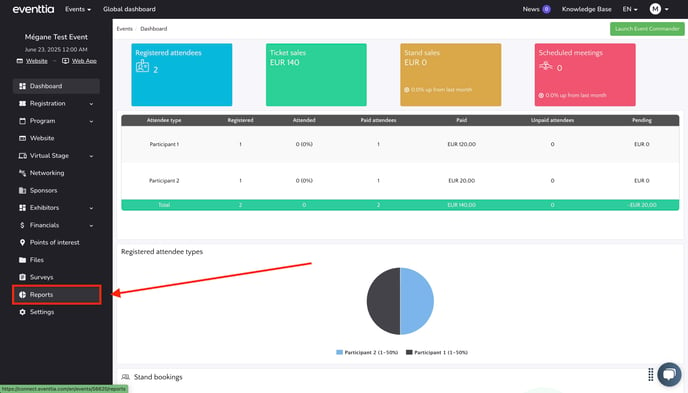
- Once in the module, you will have several topics representing the list of modules that can generate reports.
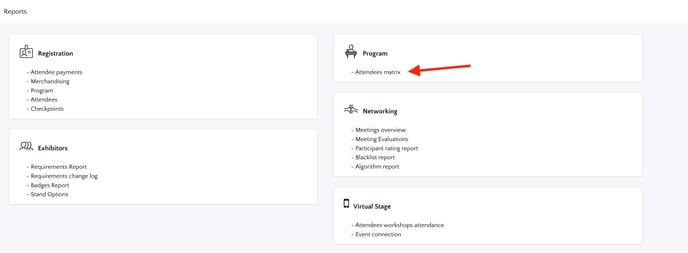
- In the **"Program"** section, click on the **"Attendees Matrix"** link.
#### Step 2.
- You will find through this link, a table showing the enrolments of each participant in the various activities available.
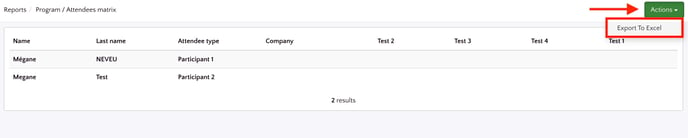
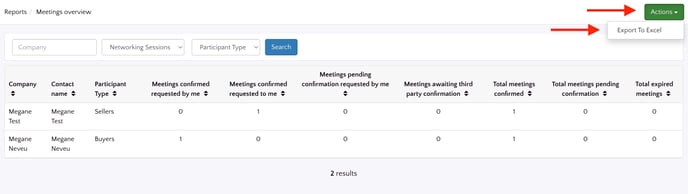
- You can then export this data to an Excel file, which allows you to share it and use it as you wish. To do this, simply click on the green button "**Actions**" then "**Export to Exce**l" button located at the top right-hand corner of your screen.
#### Step 3.
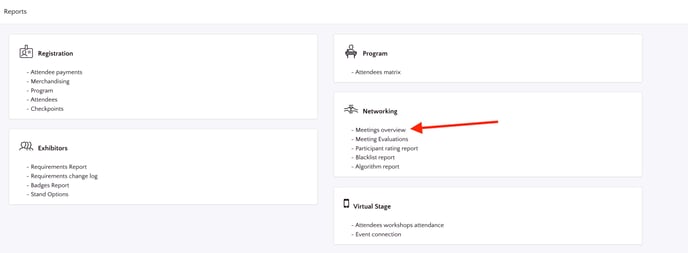
- The other sections function more or less identically. For example, in the **"Networking"** section, you can track the progress of your networking sessions.
- If you want to check the status of your participants' meetings, simply click on **"Meetings overview"**.
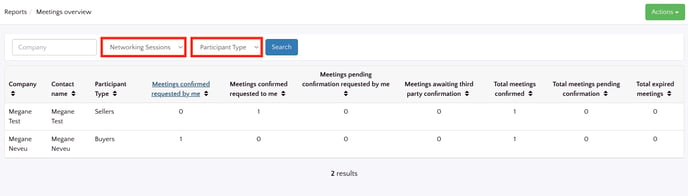
- Various dropdown menus appear which allow you to filter your participants to refine your search.
- For example, by selecting the right options, it is possible to track the meeting status of only the **"Buyers"** in the session called **"The Networking Session"**.
- And, as we saw before, it is possible to export this information to Excel using the green **"Actions"** button.
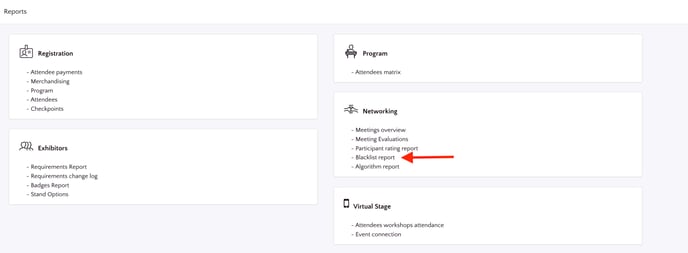
- The Networking report section also now allows you to view a **"Blacklist report"**. This lets you view the attendees that participants do not want to meet with.
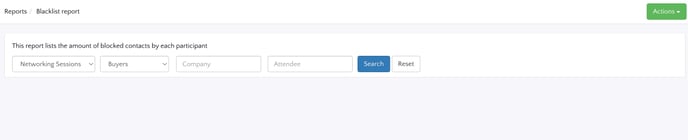
- You can search for an attendee by selecting the relevant networking session and participant type, and then by entering their personal details. When you find your attendee, you will be able to view those contacts with whom they do not want to meet.
### There you go! You now know everything about the "Reports" module.
- [Configure your account and create your first event](https://help.eventtia.com/knowledge/configure-your-account-and-create-your-first-event?hsLang=en#main-content)
- [Configure your account and set up your users](https://help.eventtia.com/knowledge/configure-your-account-and-create-your-first-event?hsLang=en#configure-your-account-and-set-up-your-users)
- [Create an Event in 30 Minutes](https://help.eventtia.com/knowledge/configure-your-account-and-create-your-first-event?hsLang=en#create-an-event-in-30-minutes)
- [Connect your Payment Gateway](https://help.eventtia.com/knowledge/configure-your-account-and-create-your-first-event?hsLang=en#connect-your-payment-gateway)
- [Configure and use your Eventtia modules & features](https://help.eventtia.com/knowledge/configure-and-use-your-eventtia-modules-features?hsLang=en#main-content)
- [Registration & Ticketing](https://help.eventtia.com/knowledge/configure-and-use-your-eventtia-modules-features?hsLang=en#registration-ticketing)
- [Badges](https://help.eventtia.com/knowledge/configure-and-use-your-eventtia-modules-features?hsLang=en#badges)
- [Networking, Matchmaking, 1:1 Meetings](https://help.eventtia.com/knowledge/configure-and-use-your-eventtia-modules-features?hsLang=en#networking-matchmaking-11-meetings)
- [Event program](https://help.eventtia.com/knowledge/configure-and-use-your-eventtia-modules-features?hsLang=en#event-program)
- [Virtual Stage / Web App for Virtual Events](https://help.eventtia.com/knowledge/configure-and-use-your-eventtia-modules-features?hsLang=en#virtual-stage-web-app-for-virtual-events)
- [Communications](https://help.eventtia.com/knowledge/configure-and-use-your-eventtia-modules-features?hsLang=en#communications)
- [Online Payments](https://help.eventtia.com/knowledge/configure-and-use-your-eventtia-modules-features?hsLang=en#online-payments)
- [Event Web Pages, Website Composer](https://help.eventtia.com/knowledge/configure-and-use-your-eventtia-modules-features?hsLang=en#event-web-pages-website-composer)
- [Sponsors](https://help.eventtia.com/knowledge/configure-and-use-your-eventtia-modules-features?hsLang=en#sponsors)
- [Surveys](https://help.eventtia.com/knowledge/configure-and-use-your-eventtia-modules-features?hsLang=en#surveys)
- [On-site Check-In App](https://help.eventtia.com/knowledge/configure-and-use-your-eventtia-modules-features?hsLang=en#on-site-check-in-app)
- [Data, Analytics & Reports](https://help.eventtia.com/knowledge/configure-and-use-your-eventtia-modules-features?hsLang=en#data-analytics-reports)
- [API](https://help.eventtia.com/knowledge/configure-and-use-your-eventtia-modules-features?hsLang=en#api)
- [Streaming (Video & Audio)](https://help.eventtia.com/knowledge/configure-and-use-your-eventtia-modules-features?hsLang=en#streaming-video-audio)
- [Guides for your attendees](https://help.eventtia.com/knowledge/guides-for-your-attendees?hsLang=en#main-content)
- [Q&A module (Questions and Answers)](https://help.eventtia.com/knowledge/guides-for-your-attendees?hsLang=en#qa-module-questions-and-answers)
- [Event app for attendees](https://help.eventtia.com/knowledge/guides-for-your-attendees?hsLang=en#event-app-for-attendees)
- [Virtual stage - Event app for virtual events](https://help.eventtia.com/knowledge/guides-for-your-attendees?hsLang=en#virtual-stage-event-app-for-virtual-events)
- [Networking](https://help.eventtia.com/knowledge/guides-for-your-attendees?hsLang=en#networking)
- [Frequently Asked Questions](https://help.eventtia.com/knowledge/frequently-asked-questions?hsLang=en)
- [Common errors and issues: Identification and solutions](https://help.eventtia.com/knowledge/common-errors-and-issues-identification-and-solutions?hsLang=en)
- [Website Composer](https://help.eventtia.com/knowledge/website-composer?hsLang=en#main-content)
- [Introduction to the website editor](https://help.eventtia.com/knowledge/website-composer?hsLang=en#introduction-to-the-website-editor)
- [Modules](https://help.eventtia.com/knowledge/modules?hsLang=en#main-content)
- [Communications](https://help.eventtia.com/knowledge/modules?hsLang=en#communications)
- [Virtual Stage](https://help.eventtia.com/knowledge/virtual-stage?hsLang=en)
- [Support](https://help.eventtia.com/knowledge/support?hsLang=en)
[](https://www.eventtia.com/)
Event Managment Software
Copyright © 2026, Eventtia
```json
{
"@context" : "https://schema.org",
"@type" : "VideoObject",
"caption" : {
"@type" : "MediaObject",
"contentUrl" : "https://help.eventtia.com/media-transcripts/201643281183/en.vtt",
"inLanguage" : "en",
"name" : "en Captions"
},
"contentUrl" : "https://4235311.fs1.hubspotusercontent-na1.net/hubfs/4235311/Generating%20Registration%20Reports%20in%20Eventtia%20%F0%9F%93%8A.mp4",
"dateModified" : "2025-12-03T15:01:08.195Z",
"duration" : "PT3M25S",
"height" : 1080,
"name" : "Generating Registration Reports in Eventtia 📊",
"thumbnailUrl" : "https://4235311.fs1.hubspotusercontent-na1.net/hubfs/4235311/Generating%20Registration%20Reports%20in%20Eventtia%20%F0%9F%93%8A.mp4/medium.jpg",
"uploadDate" : "2025-12-03T15:00:52.116Z",
"width" : 1920
}
```