---
title: How to add a new user
description: In order to share information and actions with other members of your team, Eventtia allows you to create multiple users in your account.
---
[Skip to content](https://help.eventtia.com/knowledge/how-to-create-a-new-user#main-content)
- [English](https://help.eventtia.com/knowledge/how-to-create-a-new-user)
- [Español](https://help.eventtia.com/es/knowledge/cómo-crear-un-nuevo-usuario)
- [Français](https://help.eventtia.com/fr/knowledge/comment-créer-un-nouvel-utilisateur)
English
Show submenu for translations
[![Logo black transparent background.png\]](https://help.eventtia.com/hs-fs/hubfs/Logo%20black%20transparent%20background.png?height=40&name=Logo%20black%20transparent%20background.png)](https://eventtia.com/)
Open main navigation
Close main navigation
- - [English](https://help.eventtia.com/knowledge/how-to-create-a-new-user)
- [Español](https://help.eventtia.com/es/knowledge/cómo-crear-un-nuevo-usuario)
- [Français](https://help.eventtia.com/fr/knowledge/comment-créer-un-nouvel-utilisateur)
English
Show submenu for translations
- [Create a ticket for our Support Team](https://help.eventtia.com/knowledge/kb-tickets/new)
[Create a ticket for our Support Team](https://help.eventtia.com/knowledge/kb-tickets/new?hsLang=en)
Welcome to Eventtia Knowledge Base
- There are no suggestions because the search field is empty.
1. [Knowledge Base](https://help.eventtia.com/knowledge?hsLang=en)
2. [Configure your account and create your first event](https://help.eventtia.com/knowledge/configure-your-account-and-create-your-first-event?hsLang=en)
3. [Configure your account and set up your users](https://help.eventtia.com/knowledge/configure-your-account-and-create-your-first-event?hsLang=en#configure-your-account-and-set-up-your-users)
# How to add a new user
## In order to share information and actions with other members of your team, Eventtia allows you to create multiple users in your account.
In Eventtia, there are two types of users:
1. **Super Admin**: Has access to all features and events.
2. **User (with a specific role)**: Has limited access to a perimeter of events and limited feature-management rights. A specific role must be set up in advance. See [How to set up and manage user permissions](https://help.eventtia.com/knowledge/how-to-manage-user-permissions?hsLang=en) to learn how to create and assign roles.
#### Step 1
- After logging into Eventtia, navigate to the top right corner of the screen and click on your profile icon. From the dropdown menu, select "**User**".

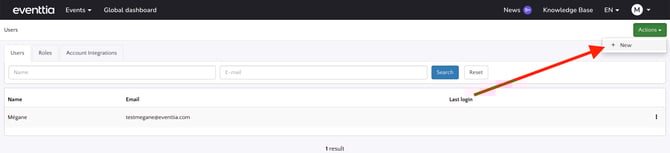
- To create a new user, select the "**Users**" module at the top of the menu bar and click the "New" button.
- In the "Role" field, select the pre-created role from the dropdown menu to assign the appropriate user access. Then, proceed to fill in the remaining required fields for the user
- Assign them a password
- Then define the user access type. Access policies allow the client to create specific access levels for the account users: event planner, on-site user, and time-based access. See [How to manage user access: A comprehensive policy manual](https://help.eventtia.com/knowledge/user-access-policy-manual?hsLang=en) to learn how to configure user access type.
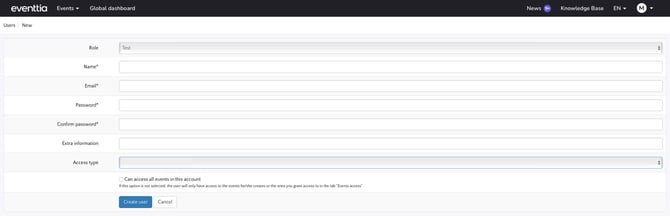
- Click "Create user" to complete the process.
#### **Step 2**
- To grant the user access to rights on an event, they need to have a role different than SuperAdmin.
- Click on their profile and go to the "Events" tab. Once in the tab, click on the green "Actions" button and then on "Add event" to grant access to the management of one of your existing events.

- Type an event from the list of events in your Eventtia account, then click "Save".

- Once saved, the event will appear under the "Events" tab. When the configuration is complete, click "Save"
### You now know how to create a new user with Eventtia and assign user permissions.
- [Configure your account and create your first event](https://help.eventtia.com/knowledge/configure-your-account-and-create-your-first-event?hsLang=en#main-content)
- [Configure your account and set up your users](https://help.eventtia.com/knowledge/configure-your-account-and-create-your-first-event?hsLang=en#configure-your-account-and-set-up-your-users)
- [Create an Event in 30 Minutes](https://help.eventtia.com/knowledge/configure-your-account-and-create-your-first-event?hsLang=en#create-an-event-in-30-minutes)
- [Connect your Payment Gateway](https://help.eventtia.com/knowledge/configure-your-account-and-create-your-first-event?hsLang=en#connect-your-payment-gateway)
- [Configure and use your Eventtia modules & features](https://help.eventtia.com/knowledge/configure-and-use-your-eventtia-modules-features?hsLang=en#main-content)
- [Registration & Ticketing](https://help.eventtia.com/knowledge/configure-and-use-your-eventtia-modules-features?hsLang=en#registration-ticketing)
- [Badges](https://help.eventtia.com/knowledge/configure-and-use-your-eventtia-modules-features?hsLang=en#badges)
- [Networking, Matchmaking, 1:1 Meetings](https://help.eventtia.com/knowledge/configure-and-use-your-eventtia-modules-features?hsLang=en#networking-matchmaking-11-meetings)
- [Event program](https://help.eventtia.com/knowledge/configure-and-use-your-eventtia-modules-features?hsLang=en#event-program)
- [Virtual Stage / Web App for Virtual Events](https://help.eventtia.com/knowledge/configure-and-use-your-eventtia-modules-features?hsLang=en#virtual-stage-web-app-for-virtual-events)
- [Communications](https://help.eventtia.com/knowledge/configure-and-use-your-eventtia-modules-features?hsLang=en#communications)
- [Online Payments](https://help.eventtia.com/knowledge/configure-and-use-your-eventtia-modules-features?hsLang=en#online-payments)
- [Event Web Pages, Website Composer](https://help.eventtia.com/knowledge/configure-and-use-your-eventtia-modules-features?hsLang=en#event-web-pages-website-composer)
- [Sponsors](https://help.eventtia.com/knowledge/configure-and-use-your-eventtia-modules-features?hsLang=en#sponsors)
- [Surveys](https://help.eventtia.com/knowledge/configure-and-use-your-eventtia-modules-features?hsLang=en#surveys)
- [On-site Check-In App](https://help.eventtia.com/knowledge/configure-and-use-your-eventtia-modules-features?hsLang=en#on-site-check-in-app)
- [Data, Analytics & Reports](https://help.eventtia.com/knowledge/configure-and-use-your-eventtia-modules-features?hsLang=en#data-analytics-reports)
- [API](https://help.eventtia.com/knowledge/configure-and-use-your-eventtia-modules-features?hsLang=en#api)
- [Streaming (Video & Audio)](https://help.eventtia.com/knowledge/configure-and-use-your-eventtia-modules-features?hsLang=en#streaming-video-audio)
- [Guides for your attendees](https://help.eventtia.com/knowledge/guides-for-your-attendees?hsLang=en#main-content)
- [Q&A module (Questions and Answers)](https://help.eventtia.com/knowledge/guides-for-your-attendees?hsLang=en#qa-module-questions-and-answers)
- [Event app for attendees](https://help.eventtia.com/knowledge/guides-for-your-attendees?hsLang=en#event-app-for-attendees)
- [Virtual stage - Event app for virtual events](https://help.eventtia.com/knowledge/guides-for-your-attendees?hsLang=en#virtual-stage-event-app-for-virtual-events)
- [Networking](https://help.eventtia.com/knowledge/guides-for-your-attendees?hsLang=en#networking)
- [Frequently Asked Questions](https://help.eventtia.com/knowledge/frequently-asked-questions?hsLang=en)
- [Common errors and issues: Identification and solutions](https://help.eventtia.com/knowledge/common-errors-and-issues-identification-and-solutions?hsLang=en)
- [Modules](https://help.eventtia.com/knowledge/modules?hsLang=en#main-content)
- [Communications](https://help.eventtia.com/knowledge/modules?hsLang=en#communications)
- [Virtual Stage](https://help.eventtia.com/knowledge/virtual-stage?hsLang=en)
- [Support](https://help.eventtia.com/knowledge/support?hsLang=en)
[](https://www.eventtia.com/)
Event Managment Software
Copyright © 2026, Eventtia
```json
{
"@context" : "https://schema.org",
"@type" : "VideoObject",
"caption" : {
"@type" : "MediaObject",
"contentUrl" : "https://help.eventtia.com/media-transcripts/199721233590/en.vtt",
"inLanguage" : "en",
"name" : "en Captions"
},
"contentUrl" : "https://4235311.fs1.hubspotusercontent-na1.net/hubfs/4235311/Creating%20and%20Managing%20Users%20in%20Eventtia.mp4",
"dateModified" : "2025-11-14T10:13:53.931Z",
"duration" : "PT2M10S",
"height" : 720,
"name" : "Creating and Managing Users in Eventtia",
"thumbnailUrl" : "https://4235311.fs1.hubspotusercontent-na1.net/hubfs/4235311/Creating%20and%20Managing%20Users%20in%20Eventtia.mp4/medium.jpg",
"uploadDate" : "2025-11-14T10:13:38.545Z",
"width" : 1366
}
```